
AI Spend Analysis Tools: How Companies Use AI for Better Spend Control
- Invoices stuck in AP queues: Approvals lag while invoices wait for sign-off.
- POs buried in inboxes: Purchase orders sit outside structured workflows.
- Expenses scattered across spreadsheets: Expense data never reaches finance until after the fact.
By the time finance spots an overspend, the money is already out the door. Leaders explain unplanned costs; teams scramble to figure out what’s left in budget.
Modern spend analysis software brings this kind of intelligence directly into the workflow—giving finance teams visibility across the entire spend lifecycle without leaving the platform. This article explains how it works and what makes it different from traditional reporting.
How AI spend analysis tools help companies act faster
Speed matters most when finance teams are trying to answer questions while there is still time to influence the outcome. By the time a variance appears in a month-end report, the opportunity to prevent overspend may already be gone.
AI spend analysis tools close that gap by letting finance teams investigate changes as they happen, without exporting data or rebuilding reports. Instead of stopping at “which categories are over budget?”, teams can keep asking: Which vendors are driving the increase? What changed this month? Is this a one-time purchase, a seasonal pattern, or a broader trend?
| Traditional Reporting | AI Spend Analysis |
|---|---|
| Shows what already happened | Explains why it happened |
| Relies on month-end exports | Answers spend questions on demand via conversational queries |
| Reactive—explains variances after the fact | Identifies trends and variances as they emerge, with context |
With AI-driven insight, organizations can:
- Anticipate cost pressures early by identifying vendor or category spikes before they roll up into overspend.
- Move from insight to action faster by drilling into the orders, vendors, departments, or categories behind a spike, then deciding whether to investigate a purchase, adjust a forecast, or follow up with a budget owner before month-end.
- Benchmark spend behavior across teams or over time to identify inefficiencies and opportunities for purchasing process improvements.
- Give teams trusted context with AI-generated summaries that connect changes back to the underlying spend activity.
The result is better decision-making from real-time budget tracking, not just faster analysis. Hours of manual reconciliation become instant, in-workflow insights.
For finance leaders, the payoff includes:
- Fewer month-end surprises: See which departments, categories, or vendors are trending off plan before the variance becomes a budget problem.
- Faster budget-owner conversations: Walk into check-ins with the orders, suppliers, amounts, and explanations behind the numbers already in hand.
- Earlier intervention on overspend: Decide whether to pause approvals, follow up on a purchase, adjust a forecast, or review vendor pricing while there is still time to act.
- Less manual reporting work: Reduce the time spent exporting CSVs, rebuilding spreadsheets, and explaining the same numbers in separate conversations.
- More confident spend decisions: Connect budget movement to the actual purchasing activity behind it, so decisions are based on context, not static reports.
This marks a shift from reactive financial management to proactive spend management. Spend analysis software helps finance teams move beyond seeing the numbers sooner to understanding what is changing, why it is happening, and where to act next.
How does AI make it easier to understand and communicate spend data?
AI tools make spend data easier to understand by connecting each number to the activity behind it. A budget variance can be traced back to the vendor orders, categories, approvals, funding lines, timing shifts, or recurring costs that caused the change.
It also turns that activity into a plain-language explanation. Instead of sharing a report that says, “Program supplies are over budget,” teams can explain, “Program supply spend is trending above plan because two large vendor orders were approved earlier than expected, and recurring service costs increased compared to last quarter.”
That kind of explanation is easier to communicate because it gives people the context they need to respond. They can see what changed, why it changed, what contributed to the variance, and where attention is needed next.
AI helps turn disconnected transactions into a shared understanding of spend performance, so conversations focus less on interpreting the report and more on the decisions that lead to better spend management.
Practical ways to use AI spend analysis tools for better spend control
AI spend analysis isn’t about replacing finance teams—it’s about giving them leverage. Companies that see the biggest impact start small: they layer insights where decisions already happen, then build from there.
1. Build one trusted view of spend
AI can only improve spend control when it has the right foundation. If teams are analyzing purchasing, invoice, expense, and budget data separately, they are still working from a fragmented view. Leading spend management software gives AI the connected data foundation it needs to surface reliable patterns, explain variances, and help teams make decisions with confidence.
A connected view of spend gives AI the foundation to identify patterns across purchase orders, invoices, vendors, categories, departments, and budgets. It also gives teams more confidence that recommendations are based on the full picture, not a partial export.
According to the 2026 AI Readiness in Finance Report, 35% of finance and procurement leaders cite trust in the AI model as the top barrier to broader adoption. That trust starts with the data. Teams that bring spend data into one connected view before deploying AI get more reliable insights and stronger control over the decisions that follow.
2. Investigate anomalies before they become overspend
When something looks off in the numbers, teams often have to export a spreadsheet and start digging. Spend analysis software makes that investigation faster by letting users ask direct questions, such as “Which vendors drove the spike in March?” or “Which categories are trending above plan this quarter?”
The value is not just speed. It is the ability to understand what is driving the change while there is still time to respond. Teams can identify whether a variance is tied to a vendor, category, department, approval, or timing shift, then decide whether to follow up, pause a purchase, adjust a forecast, or review the budget.
3. Bring AI into reviews and approvals
Spend control depends on the moments before money is committed, not just the reports that come afterward. AI can help teams walk into purchase requisition reviews, budget check-ins, and approval conversations with the context already in hand.
Instead of reviewing a request in isolation, teams can ask layered questions: How does this purchase compare to similar spend? Is this vendor already trending above plan? Are there price variances across suppliers? What budget line will this affect?
That context helps approvers make better decisions without slowing the process down.
4. Prepare for vendor negotiations with better spend history
Before a contract renewal or vendor review, AI spend analysis tools can help teams understand the full history of spend with that supplier. They can review monthly trends, peak spend periods, category-level changes, price variance, and how the vendor compares with others in the same category.
Queries that once required hours of manual data pulling can be answered in minutes. That changes the negotiation dynamic. Teams can walk in with a clearer view of pricing, usage, and purchasing patterns instead of relying on static reports or last-minute analysis.
According to the Deloitte Global CPO GenAI Survey, among organizations that have deployed AI in procurement, about 50% report doubling their ROI compared to traditional methods, with enhanced analytics and decision-making ranking as the top value unlocked ahead of productivity gains and cost optimization combined.
5. Make visibility shared, not siloed
Controlling company spend is harder when every team works from a different version of the numbers. AI spend analysis software works best when it gives stakeholders access to the same real-time view of spend, with explanations that connect back to the underlying activity.
That shared visibility helps teams move from debating the numbers to deciding what to do next. They can review vendor activity, adjust budgets, question unusual spend, or realign purchasing decisions before small issues become larger budget problems.
Inside Procurify’s Spend Insights: Turning AI into everyday action
Every day, teams use Procurify to manage the spend that affects their budgets, from intake to order through the rest of the procurement process. Each step creates context around what has been requested, approved, committed, received, and paid.
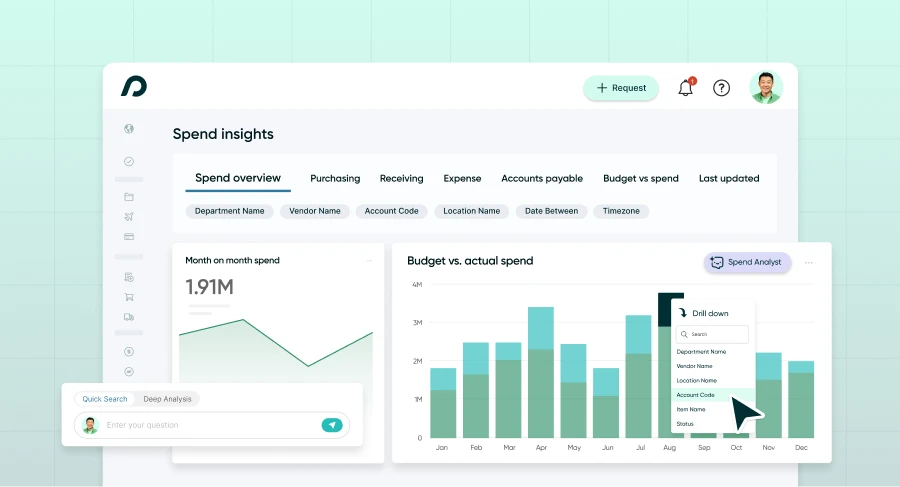
Spend Insights uses that context to connect day-to-day decisions back to budget performance. Teams can compare budgeted spend against committed spend by department, account code, and category, then drill into the orders, vendors, amounts, and statuses behind any number. That makes it easier to see what is trending over plan, what is driving the change, and where action may be needed.
Spend Analyst adds AI-powered analysis to the same Procurify data. Users can ask plain-language questions like:
- Which categories are tracking over budget?
- Which vendors are driving the increase?
- Has this supplier’s spend changed over time?
- How do costs compare across suppliers in the same category?
Because Spend Analyst keeps the context of the conversation, teams can move from a budget variance to a supplier trend, monthly breakdown, or cost comparison without starting over.
This is what AI looks like when it is built into the workflow: teams can see why a number changed, explain what needs attention, and decide what to do next before budgets move further off plan.
See Spend Insights in action with an interactive product tour.
Watch how Spend Insights works in real life
As with all Procurify features, Spend Insights is SOC 2 Type 2 compliant, so your data is always secure and handled with care.
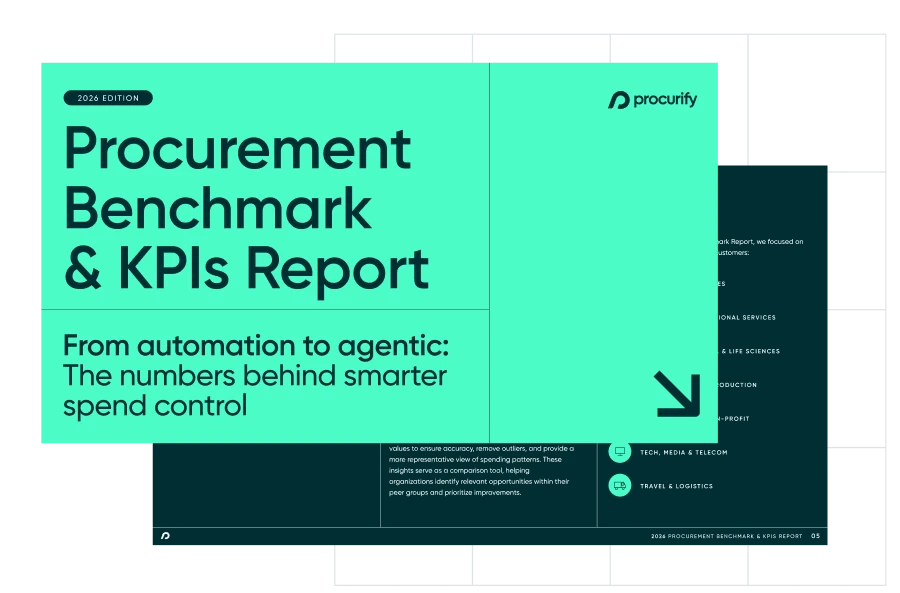
$30B+ in real spend data you won’t get anywhere else
Find out what it takes to move from reactive to AI-driven operations.