


Purchase Orders: All You Ever Need to Know
A purchase order (PO) is a document a buyer sends to a vendor to confirm what’s being purchased, for what price, and on what terms. Once accepted, it becomes a legally binding record that protects both parties and maintains consistent purchasing.
For finance teams, they’re a practical way to support spend management by tying purchases to approvals, budgets, and documentation before money goes out the door.
This guide breaks down how purchase orders work, what to include, and how to build a PO process that scales.
What is a purchase order?
Before we get into steps and best practices, it helps to define what a purchase order is and what it includes.
Purchase order definition: A purchase order (PO) is a formal document a buyer sends to a seller to request specific goods or services at agreed pricing and terms. When the seller accepts it, the PO becomes a legally binding agreement that documents what will be delivered and what will be paid.
Beyond the transaction, a PO creates a reliable record for forecasting and budget control—one reason the importance of purchase orders extends far beyond paperwork.
Beyond the transaction, a PO creates a consistent paper trail for spend management—making it easier to track commitments, forecast costs, prevent duplicate or off-policy purchases, and match invoices accurately.
Key elements of a purchase order include:
- PO number – A unique identifier for tracking the order
- Buyer and supplier information – Names and contact details of both parties
- Description of goods/services – Clear line-item details of what’s being ordered
- Quantity and price – Amount ordered and agreed unit pricing
- Delivery date and location – When and where the order should be delivered
- Payment terms – Conditions for payment (e.g., Net 30, partial payments, due on receipt)

Types of purchase orders
Not all purchase orders serve the same purpose. Businesses use different PO types depending on how predictable the purchase is, how often it occurs, and the required level of flexibility.
Standard Purchase Order (SPO)
Used for one-time purchases with clearly defined details such as item, quantity, price, and delivery date. This is the most common type of PO.
Planned Purchase Order (PPO)
Used when quantities and pricing are known, but delivery dates are scheduled over time. Specific release dates are confirmed later.
Blanket Purchase Order (BPO)
Blanket POs are used for recurring purchases from the same supplier. Pricing and general terms are agreed upon in advance, but exact quantities may vary.
Contract Purchase Order (CPO)
A framework agreement that establishes terms and conditions with a supplier without specifying exact quantities or delivery schedules. Individual POs are later issued under the contract.
To manage POs efficiently, choosing the right PO type improves purchasing consistency, supports better forecasting, and reduces administrative friction through effective purchase order management.
Legal considerations of purchase orders
A purchase order becomes legally binding once accepted by the supplier. That means both parties are obligated to follow the agreed terms.
Key legal considerations include:
- Contractual obligation: Acceptance creates an enforceable agreement between buyer and seller.
- Terms and conditions: Payment terms, delivery expectations, penalties, and dispute clauses should be clearly defined.
- Regulatory compliance: Certain industries and government contracts require stricter documentation standards.
- Accuracy: Errors in quantities, pricing, or delivery details can lead to disputes or financial risk.
Because a PO carries contractual weight, clarity and consistency are critical.
Why do companies use POs?
In early-stage businesses, purchasing tends to be informal. Someone verbally mentions a need, an email is sent to a vendor, a manager approves it, and the invoice gets paid. This works when volume is low and purchases are simple.
As organizations grow, buying becomes more frequent and more distributed across teams. Without a purchase order, key details can get lost: what was approved, what price was agreed, what should be delivered, and when payment should happen.
A purchase order solves that by creating a clear, shared record for both buyer and seller. It documents order details up front, provides legal clarity upon acceptance, and creates a reliable audit trail that supports budget visibility and invoice matching later.
What information should be on a purchase order?
A purchase order (PO) contains essential details that outline the specifics of a transaction between a buyer and a seller. Here’s a breakdown of the typical information included in a purchase order:
-
Purchase order number:
A unique identifier for each purchase order, aiding in tracking and reference.
-
Date:
The date when the purchase order was created and, often, the expected delivery date.
-
Buyer's information:
This includes the company name, address, contact details, and possibly a company identification number.
-
Seller's information (vendor):
The name, address, and contact details of the supplier or service provider.
-
Description of goods/services:
Detailed listings of items being purchased, including product codes, descriptions, quantities, and unit prices.
-
Total amount:
The cumulative cost of all items/services, often broken down into subtotals, taxes, shipping fees, and the grand total.
-
Payment terms:
Specifies conditions for payment, such as net 30 days, upon receipt, or any discounts for early payments.
-
Shipping details:
Information about the delivery method, shipping address, any associated costs, and expected delivery dates.
-
Terms and conditions:
Any specific terms or conditions related to the purchase, including return policies, warranties, or other stipulations.
-
Authorized signatures:
Signatures or approval from relevant parties in the buyer’s organization, confirming the authenticity and approval of the purchase order.
-
Special instructions or notes:
Any additional information or specific instructions related to the order.
-
Tax information:
Details about applicable taxes, their rates, and total tax amounts.
Remember, while these are standard elements in many purchase orders, the exact content can vary based on the nature of the business, industry standards, and specific company practices.
Purchase orders can be changed to fit what a business needs, so the list given isn’t complete. With tools like Procurify, you can put in account codes when you start the order. This makes matching records easier and helps transfer information to your accounting systems or ERP without hassle.
What do purchase orders look like?
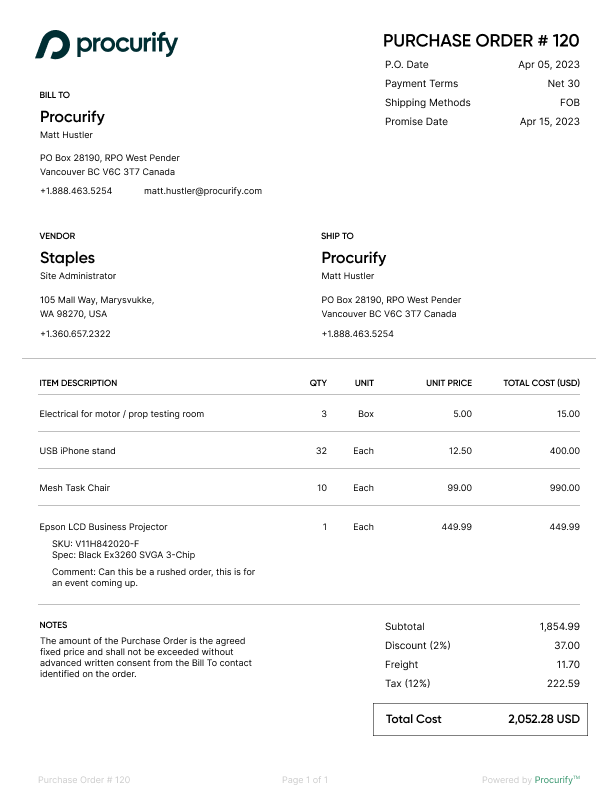
Companies typically have a standardized purchase order document with stock information to ensure consistency. Here is an example that shows you what a purchase order looks like:
How do purchase orders work?
The purchasing process formalizes buying functions by detailing a buyer’s request for goods or services, which, when accepted by the seller, becomes a legally binding agreement. Purchase orders function as a systematic approach to the buying process. At a high level, here is how purchase orders work:
-
Initiation:
The buyer identifies a need for goods or services and prepares a purchase order detailing the specifics, such as item descriptions, quantities, and prices.
-
Issuance:
The completed purchase order is sent to the seller for consideration.
-
Acceptance:
Upon reviewing the purchase order, the seller can either accept or reject it. If accepted, the purchase order serves as a contractual agreement, setting clear expectations for both parties.
-
Fulfillment:
The seller then prepares and delivers the requested items or services as per the terms outlined in the purchase order.
-
Payment:
After receiving and verifying the goods or services, the buyer processes payment, often referencing the purchase order number to ensure accuracy.
-
Record keeping:
Both parties retain copies of the purchase order for their records, aiding in inventory management, financial accounting, and potential future audits.
In essence, a purchase order streamlines and standardizes the procurement process, ensuring transparency, accuracy, and mutual understanding between buyers and sellers.
The advantages and disadvantages of a purchase order
Purchase orders create structure around buying, but they work best when the process is consistent.
Advantages
- Prevent duplicate orders and surprise invoices
- Create a clear audit trail (who approved what, when, and why)
- Improve budget visibility by documenting committed spend
- Reduce invoice disputes with clear pricing, quantities, and terms
- Support better vendor communication and delivery coordination
Potential drawbacks
- Adds process overhead for small, low-risk purchases
- Requires consistent adoption—otherwise, invoices arrive without a PO and matching breaks down
Why automate the purchase order process?
As PO volume grows, the work isn’t creating the PO, its the entire purchase order process: collecting the right details, routing approvals, keeping documentation together, and fixing issues when invoices don’t match. That’s where manual processes slow down and where small gaps turn into repeated follow-ups.
Automating the purchase order process helps by standardizing what information is captured up front, routing approvals consistently, and keeping the PO, receipts, and invoice context connected in one record. The result is fewer exceptions downstream and less time spent chasing missing details.
For teams evaluating a new approach, the benefits usually show up in three practical ways:
- Faster PO cycle times through structured routing and fewer approval bottlenecks
- Cleaner matching because PO data is consistent and easier to reconcile to invoices
- Better visibility into committed spend, open POs, and audit-ready documentation
Why many teams shift to electronic purchase orders
As purchase volume increases, manual PO processes become harder to maintain. Email approvals, shared spreadsheets, and disconnected systems create small inefficiencies that compound over time.
The shift to electronic purchase orders isn’t just about going paperless. It’s about creating a more consistent workflow—where requests, approvals, documentation, and invoice matching stay connected from start to finish.
When teams evaluate digital PO systems, they’re typically looking for improvements in three areas:
-
Speed — fewer delays in routing and approvals
-
Accuracy — fewer missing details and invoice mismatches
-
Visibility — clearer insight into committed spend and PO status
When should you use purchase order software?
Most organizations understand what a purchase order is and how to use them but they don’t always know how to remove the friction they can cause
Purchase order software becomes valuable when the question isn’t whether to use POs, but whether the workflow is predictable, enforceable, and visible.
It may be time to evaluate a system if:
1. Approvals depend on reminders rather than routing.
If requests sit in inboxes, bounce between managers, or require follow-ups to move forward, the bottleneck isn’t policy—it’s workflow design.
2. PO quality varies by department.
When some teams include full vendor, pricing, and coding details—and others don’t—invoice matching becomes inconsistent and exception-heavy.
3. Finance lacks visibility into committed spend.
If you can see what’s been paid but not what’s been approved and is still outstanding, budget forecasting becomes reactive instead of controlled.
4. “No PO” invoices are increasing.
When vendors submit invoices without PO references—or POs are created after delivery—the process has shifted from preventive control to cleanup.
5. Audit preparation requires manual investigation.
If answering “who approved this?” or “what was agreed to?” requires digging through emails or shared drives, documentation isn’t centralized enough.
Procurify’s purchase order software helps teams run purchase orders as a repeatable system—not a one-off document. It connects request, approval, PO creation, and documentation into a single workflow, ensuring purchasing remains consistent across departments.
What that enables:
- Standardized purchase requests and POs that capture the right details up front
- Configurable approvals based on role, department, or threshold
- Real-time budget visibility tied to purchasing activity
- Connected documentation so POs, invoices, and receipts stay linked
- Reporting on PO activity so finance can spot patterns and improve controls over time
Take the product tour to see what a connected PO workflow looks like in practice.

Preview AI Intake for Orders
Take the product tour to see how the new intake experience works.


