



Purchase Approval Workflows: A Comprehensive Guide
A purchase approval workflow determines how a purchase request moves from submission to approval — who reviews it, what information they need, and when a request should be escalated.
The challenge is making sure that process adds the right controls without adding unnecessary delay. As organizations grow, requests tend to involve more approvers, more exceptions, and more decisions about what actually needs human review.
Procurify’s Procurement Benchmark Report shows why that matters. The median requisition-to-PO cycle time settled at 55 hours in 2025, after improving the year before. The takeaway isn’t that every company should be chasing a specific number. It’s that once the obvious workflow improvements have been made, further gains depend on finding the specific step that keeps holding requests up.
Maybe requests arrive without enough information. Maybe routine purchases are being escalated unnecessarily. Or maybe too many requests are landing with the same senior approvers.
This guide looks at how purchase approval workflows work, where those bottlenecks tend to form, what approval paths can look like across different departments, and how purchase approval software can help automate the parts of the process that don’t require human judgment.
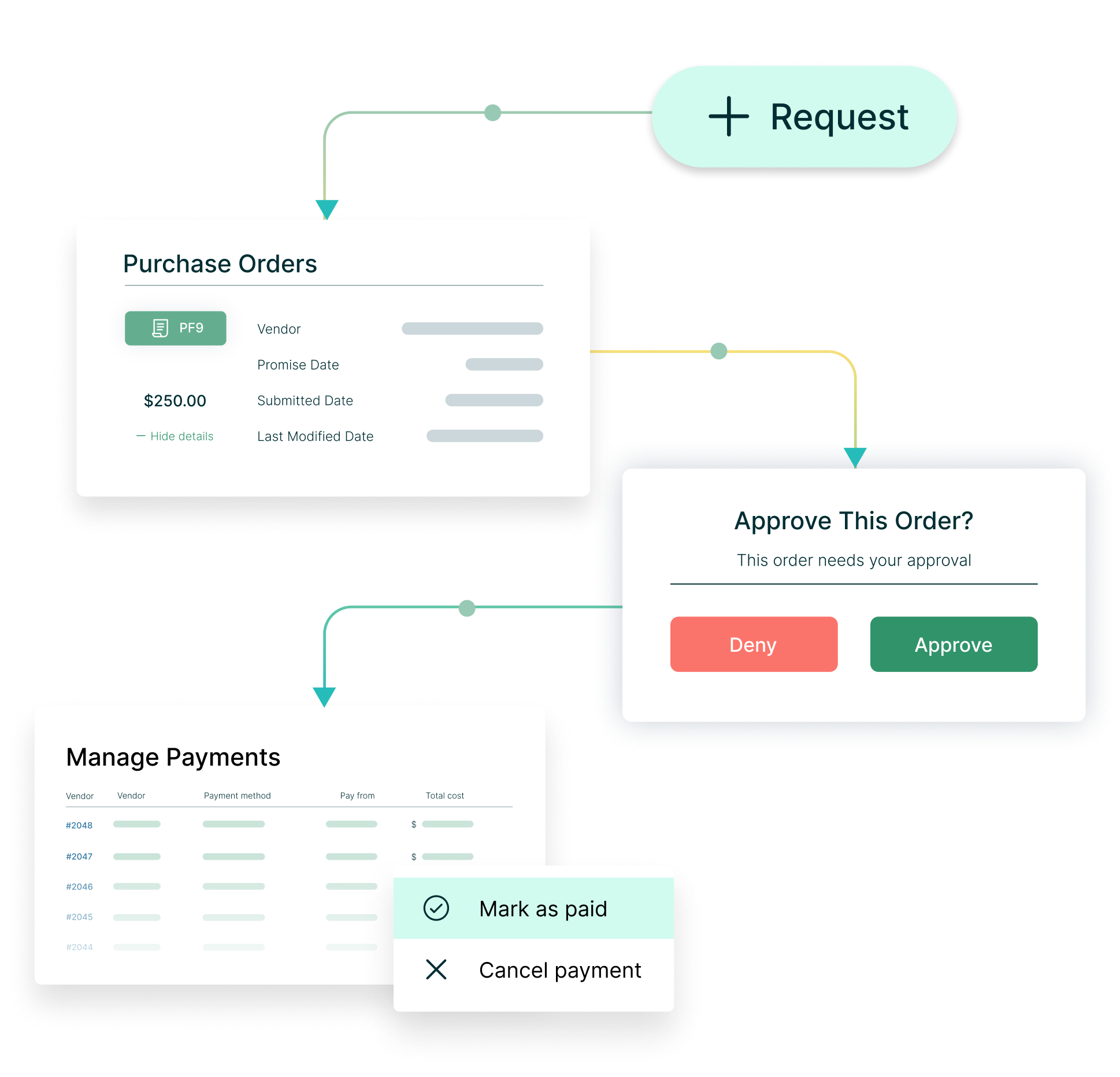
Ready to reduce approval times by 50%?
Watch our summer product webinar and see how automation and AI can cut manual steps and improve efficiency in your purchase approval workflows.
A purchase approval workflow is the set of rules that determines whether a purchase can move forward, who needs to review it, and when additional approval is required.
The path can change based on factors like purchase value, department, vendor, budget, or risk. A routine purchase may require only a manager’s approval, while a new software vendor or a large, unbudgeted contract may require additional review.
In Procurify, approval routing can use conditions, approval groups, thresholds, and final approvers to send each request through the appropriate path.
Purchase approval workflow vs. purchase order approval workflow
A purchase approval workflow can begin with the initial request and determine whether the business should make the purchase. A purchase order approval workflow is more specific: it covers the approval required before a PO is finalized or sent to the supplier.
Key stages of a purchase approval workflow
Most purchase approval workflows follow the same basic path: a request is submitted, routed to the right approvers, checked against relevant budgets or policies, and then converted into a purchase order once approved.
-
1. Submit the purchase request
The process starts with a purchase requisition that explains what is being purchased, why it is needed, the expected cost, and any supporting information an approver needs.
Getting this information right up front matters. Missing quotes, vendor details, or budget information often create delays later because approvers have to send the request back for clarification.
-
2. Route it to the right approvers
The request then follows the approval path defined by the organization.
That path might change based on purchase value, department, vendor, budget, category, or risk. Some requests may only need one approval, while others require input from Finance, IT, Legal, or an executive.
The important part is that each approver has a clear reason to be involved.
-
3. Review budget, policy, and risk
Approvers evaluate the request against the factors they are responsible for.
A manager may confirm the business need. Finance may check budget availability. IT may assess security or technical requirements. Other purchases may need additional review because of the vendor, contract terms, or size of the commitment.
This is where a good workflow helps give approvers the context they need without forcing every purchase through every possible review.
-
4. Create the purchase order
Once the required approvals are complete, the request can be converted into a purchase order.
The PO creates a record of what was approved before the organization commits to the purchase, including the supplier, amount, items or services, and relevant terms.
From there, the purchase moves into receiving, invoice processing, and payment.
Where purchase approval workflows slow down
When a purchase request takes 58 hours to become an approved purchase order, that doesn’t mean someone spent 58 hours reviewing it.
Most of that time is waiting.
A request may be waiting for missing information, sitting in the wrong person’s queue, moving through another approval layer, or being sent back because the approver doesn’t have enough context to make a decision.
That’s why requisition-to-PO cycle time is useful. It measures the full journey from an employee asking to buy something to the business having an approved PO it can act on — not just the final approval itself. In Procurify’s mid-market data, Lower Mid-Market organizations reduced the journey from 68 hours in 2023 to 58 hours in 2025, while Upper Mid-Market organizations reduced it from 75 hours to 65 hours.
The interesting part isn’t the ten hours on its own. It’s that these organizations got faster while operating with the additional departments, budgets, approvers, and purchasing scenarios that come with scale.
That tells us something important about approval workflows: complexity doesn’t automatically have to turn into delay. The real question is how much of that complexity the workflow is asking people to manage manually.
Requests aren't ready when they reach the approver
Some approval delays start before the approver ever sees the request.
If a request is missing a quote, budget context, vendor details, or other required information, the approver can’t make a decision. The request gets sent back, corrected, and routed again.
That’s not really an approval-speed problem. It’s an intake problem creating approval rework.
The better fix is to improve the request before it enters the approval queue. An intake-to-approve purchasing workflow can prompt employees for the information they need up front, while capabilities like quote extraction and AI-assisted coding help reduce missing or incorrect details.
The aim is to give approvers a request that is complete enough to act on the first time — instead of making them chase information or send it back for another pass.
Unclear approval rules send requests too far up the chain
When people aren’t sure who has authority to approve a purchase, the safest response is often to escalate it.
A routine request that could stop with a department manager gets sent to Finance or an executive “just in case.” One extra approval may not seem significant, but across hundreds of purchases, those unnecessary handoffs create a queue for the people whose attention is hardest to get.
Clear thresholds and conditional routing help prevent that. A request can follow a different path based on its value, department, vendor, category, or other conditions, so additional approval is triggered when the purchase actually warrants it.
The useful test is simple: what decision is each approver being asked to make? If two people are reviewing the same request for essentially the same reason, one of those steps may be adding time without adding much control.
Routine purchases get stuck in the same approval path as exceptions
Not every purchase needs the same level of scrutiny.
A repeat order from an approved supplier is very different from a new vendor, an unbudgeted contract, or a purchase with security implications. But when the workflow treats them the same, routine buying starts competing with higher-risk decisions for the same approvers’ attention.
That’s where predefined buying paths can help. Recurring purchases can use established suppliers, blanket POs, or other repeatable workflows, while exceptions trigger additional review only when something changes. Procurify’s purchase-to-receive workflow supports one-time purchases, recurring commitments, subscriptions, and PunchOut purchasing so teams can use the right path for different types of spend.
Purchase approval workflow examples by department
The same purchase can require very different decisions depending on who is making it and what is being bought. Finance may care about budget impact, IT about security, and Operations about whether a delay will hold up work on the ground.
That’s why effective approval workflows are built around the decision that needs to be made, not just a standard chain of approvers.
Finance and accounts payable
Finance and AP are often among the final stops in an approval chain, which can make them a catch-all for purchases other teams aren’t sure how to handle.
Take a multi-year contract. A department manager may confirm the business need, Finance checks whether the commitment fits the budget, and a larger or unbudgeted purchase may need executive review.
That makes sense when each person is making a different decision.
The problem is when Finance becomes an extra approval step for routine purchases simply because no one is sure where else they should go. Those requests start competing with contracts, budget exceptions, and other purchases where financial judgment is actually needed.
And when approvals happen outside the purchasing system — through email, Slack, or an informal conversation — AP can inherit another problem later: an invoice arrives, but there is no clear record of who approved the purchase or what was agreed.
That’s how AP becomes the cleanup crew, chasing approvals and reconciling purchases after the decision has already been made.
A better workflow keeps the financial controls that matter while giving AP a clear record of the request, approval, and resulting PO before the invoice arrives.
IT
IT purchases show why approval rules can’t be based on dollar value alone.
Someone requests a new project management tool. Another team wants an analytics platform. The price may be relatively small, but IT still needs to know whether the software is secure, whether it integrates with existing systems, whether the company already has something similar, and what data the vendor will be able to access.
When that information isn’t collected up front, IT becomes the first filter — and the request starts bouncing back and forth before anyone can make a decision.
That can also lead to a bigger problem: overlapping tools, duplicate subscriptions, and software with no clear owner.
A stronger IT approval path collects the technical information alongside the request, routes the purchase to IT when specialist review is actually required, and gives the next approver the vendor and budget context they need to continue the decision.
IT review should be reserved for purchases that genuinely require technical or security judgment.
Operations
In Operations, approval delays can have an immediate impact on work happening on the ground.
Imagine a site manager preparing a new facility. Equipment needs to arrive before a contractor does, but the request has to move through a regional lead and Finance first.
The people reviewing it may be hundreds of miles away. They see a purchase request; the site manager sees a deadline.
If there’s no approved supplier or established buying path, the request may also need additional sourcing, quotes, or vendor validation before it can move forward.
That’s where repeatable purchasing matters. PunchOut catalogs and approved supplier paths can give employees a way to buy common items from vendors that have already been vetted, while location- or purchase-based routing can send exceptions to the people who actually need to review them.
The frontline team gets what it needs without removing the controls around unusual or higher-risk purchases.
Marketing
Marketing introduces a different constraint: sometimes the cost of waiting is the opportunity itself.
A campaign owner might request a $15,000 media buy, only to wait several days for budget approval. By the time it clears, the placement may be gone or the price may have changed.
Marketing teams also tend to work with a mix of agencies, freelancers, event suppliers, software providers, and other short-term vendors. That means two similarly priced requests may require very different reviews.
An established media partner may primarily need budget approval. A new software platform could require IT or security review. A new agency agreement may need contract management before anyone commits to the spend.
The workflow should account for those differences instead of pushing every Marketing purchase through the same chain.
That gives the team room to move quickly on purchases that are already within agreed guardrails while escalating the ones that introduce new risk or an unbudgeted commitment.
Facilities and admin
Facilities and Admin often have the opposite problem: lots of small purchases.
Printer supplies. Replacement equipment. Repairs. Everyday operational items.
If every $100 request has to move through several people, the approval process can quickly become more expensive than the risk it is trying to control.
Oversight can often be built into the buying path before a $100 request reaches a long approval chain
Routine purchases from approved suppliers can follow a simpler path or predefined threshold, while larger, unusual, or out-of-policy purchases receive additional review.
That keeps small purchases from clogging approval queues — and keeps Facilities and Admin focused on running the business rather than chasing signatures.
Across all five examples, the pattern is the same: the right approval path depends on the decision that needs to be made.
Finance needs financial context. IT needs technical and security context. Operations needs the workflow to account for location and urgency. Marketing needs flexibility around timing and vendor risk. Facilities needs routine buying to stay routine.
The more clearly those decisions are built into the workflow, the less time people spend figuring out where a request should go next.
How automation changes purchase approval workflows
Every approval request consumes a small amount of someone’s attention. In a manual purchasing process, that cost can be easy to miss because requests arrive slowly and the approval chain has usually grown one step at a time. A manager gets added because Finance wants visibility. Finance gets added because the purchase might affect the budget. The CFO gets added above a certain threshold. Eventually, those layers become the process.
Procurement automation changes the economics of the purchasing process. Requests can be completed more quickly, routed instantly, checked against policy, and enriched with information before an approver ever sees them. Once that happens, the question is no longer only how to make the existing approval chain run faster. It becomes whether every decision in that chain still deserves a person’s attention.
That distinction matters because approval capacity is not unlimited. A Finance leader who spends ten minutes reviewing a routine renewal is spending ten minutes they cannot use on a new supplier agreement, an unexpected budget commitment, or a purchase that genuinely needs financial judgment. The cost of an unnecessary approval is therefore not just the time added to that request; it is also the more important decision that has to wait behind it.
This is where automation can make approval workflows fundamentally different rather than simply faster. The business can decide in advance which conditions are routine enough to be governed by policy and which ones should earn someone’s attention. An approved supplier, an established category, an available budget, or a known purchasing pattern can provide confidence without requiring the same review every time. A change to one of those conditions can be what brings a person back into the decision.
It also means approval rules should not be treated as permanent. If automation removes work from one part of the process, teams need to look at where human attention is going next. A workflow can become highly efficient at sending requests to the CFO while still being poorly designed if too many of those requests have no reason to be there.
The idea of aligning automation with the work people actually need to prioritize becomes more important as purchasing systems take on more of the administrative work themselves.
For the approver, the shift is subtle but important. Their value is no longer in being present at every checkpoint. It is in being brought into the purchases where their authority, context, or judgment can materially change what the business decides to do.
How to design a purchase approval workflow that scales
Approval workflows tend to get more complicated as a company grows. A new department needs visibility, Finance adds another control, IT starts reviewing software, larger purchases need executive sign-off, and one unusual situation becomes a permanent step in the process.
Before long, the workflow is carrying years of accumulated decisions.
A scalable purchase approval workflow does something different. It gives the business room to add complexity without automatically adding another person to every purchase.
A useful way to design or review one is to work through five questions:
| Question to ask | What a strong workflow does | Sign the workflow needs attention |
|---|---|---|
| What decision is each approver making? | Gives each approver a distinct responsibility, such as confirming the business need, checking budget, assessing security, or approving a material commitment. | Several people review the same request for essentially the same reason. |
| What does the approver need to know? | Collects the quote, vendor, budget, category, supporting documents, and other relevant information before the request reaches them. | Requests regularly come back for missing information. |
| What makes this purchase different enough to need more review? | Uses clear conditions such as value, new vendor status, budget availability, category, contract terms, or risk to trigger additional approval. | Routine purchases keep travelling up the organization because “that’s the process.” |
| What happens when the normal path breaks? | Defines who handles missing information, unavailable approvers, urgent purchases, policy exceptions, and other edge cases. | Employees move the decision into email or Slack because the formal workflow has nowhere for the request to go. |
| How will you know a rule is no longer working? | Looks at where requests wait, what gets rejected, which exceptions keep appearing, and where queues consistently build. | The only measure of success is whether the request was eventually approved. |
The first question is especially important. Approval chains are often built around hierarchy: manager, department head, Finance, executive. But hierarchy alone doesn’t explain why each person needs to be there.
For every step, you should be able to answer: What can this person decide that the person before them could not?
If there isn’t a clear answer, that step is worth challenging.
The same principle applies to approval thresholds. A threshold shouldn’t exist simply because $5,000 or $10,000 feels like an appropriate place to add another approver. It should reflect a point where the nature of the decision changes. Perhaps the financial exposure becomes material, a different budget owner becomes responsible, or executive authority is genuinely required.
And the workflow should expect exceptions rather than treating them as failures. New vendors will appear. Budgets will change. Someone will be on vacation. An urgent purchase will fall outside the normal process. Designing those paths deliberately keeps employees inside the workflow when something unusual happens instead of forcing them to create a workaround.
Finally, approval rules need to change as the business changes. A workflow that worked when a company had 100 employees may make very little sense at 500. The best signal usually isn’t that people are complaining the process is slow; it’s that the same kinds of requests keep getting returned, escalated, or stuck with the same approver.
That’s when the workflow itself needs another look.
Build a purchase approval workflow that can grow with you
A good purchase approval workflow makes it clear what needs review, who should make the decision, and what can move forward under rules the business has already established.
Those rules should evolve as the company grows. New teams, suppliers, budgets, and risks will change what needs oversight, but they shouldn’t automatically create another approval layer. The strongest workflows keep routine purchasing straightforward while giving the right people the context and authority to step in when a purchase genuinely needs their attention.
If your current approval process is becoming harder to manage as your organization grows, explore Procurify’s purchase approval software to see how configurable approval workflows can help you put those controls into practice.
Frequently Asked Questions
$30B+ in real spend data you won’t get anywhere else
Find out what it takes to move from reactive to AI-driven operations.


